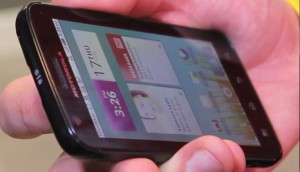
It’s nice to get out and about so the Really Mobile team jumped at the chance to attend O2′s glamourous launch party form the Palm Pre, which goes on sale today.
Surrounded by the Shoreditch-glitterati (who we blended into seamlessly) we got our first un-restricted hands-on with a GSM Pre and did a bit of celeb-spotting… Opinions on the device were mixed, but we all liked the free beef rolls.
Disclosure: Some of us received free beef rolls at the event. We decided against our usual policy of giving them away to our readers.…
{ 13 comments }
so is 'beef rolls' a euphemism ?
Ask Dan Lane. I was busy 'working' when they were being handed 'round *sniff*.
There were also pork rolls and very nice pizza… we were filming by the exit from the kitchen… dangerous stuff!
Was Jamelia there? She's often hired for glitzy phone launches.
I quite liked the Pre on Sprint EV-DO. Great browser. Small enough to fit in your pocket.
Pricey on O2.
Great review guys and gal, sounds like the party was waaaaaaaay more fun than the phone though!
Love your disclosure, awesome.
No, but she was in Budapest filming in my hotel when we went there with Nokia to look at the N900… In fact that film should be out next week (the Nokia one, not Jamelia).
well so you know I personally sold one today to a developer because the market for apps on the palm is new a lot of developers are starting to make apps for it so hopefully this trend continues and some of the developers that have tried to make apps for an almost saturated apple app store market will more over to other places like palm and ovi!!
We'll just have to wait and see!
Can't beleive you actually said you could not figure out how to send an mms. simple as opening the messaging app and hitting the + to open a new msg and then the paperclip to add a picture. Just bought the phone yesterday and took me about 5 secs to figure that out
I should probably start by saying the drinks were very very free
However, from the photos application, I hit something like send as… MMS then what? I got an MMS compose window with the photo and added some text and then… then what? where is the SEND button? there was a “TEXT” button but that just sent the text portion and there was no photo.
well this is funney…that Palm pre i sold the other day just got swapped for an iphone LOL so scrap that…no one will ever make any apps for it!!!
Brilliant
Love the bit at the end where James asks Dan about the IPHONE and he responds YES!
Comments on this entry are closed.
{ 2 trackbacks }