![Post image for Can you switch from a dongle to a MiFi? [Reader question]](../../../wp-content/uploads/Mifis-600x337.jpg)
Reader Sami has written-in with a question…
My company kindly provides me with a (limitless?) Vodafone dongle for my laptop so I can work on the go. I recently got a WiFi iPad and I’m finding it easier to carry and use but I have to be in a WiFi area to use it for work.
I’d like to know if I can buy a MiFi unit and transfer the SIM to it?
Sounds like a question quite a few people might have… let’s roll out the Really Mobile hive mind…
Is it a reasonable thing to do?
The dongle’s unlikely to be unlimited - it doesn’t tend to be the way Voda’s business tariffs work. However, you’ll be hard-pushed to use more data through an iPad than a laptop providing you don’t do something like streaming loads of media that you wouldn’t have done on the laptop. On that basis what you’re suggesting isn’t unreasonable from a cost / data use perspective.
Your firm may have rules about downloading company email on non-company devices (security policies typically) - but we’ll assume you know the rules and this is OK.
Is it technically possible?
Technically there’s very little difference between a dongle and a MiFi - the mobile networks treat them much the same. Because of this it’s entirely possible to switch a SIM from a dongle to a MiFi device. In fact most MiFi devices from UK mobile operators will also connect to a laptop via USB and work as a dongle if you ever wanted to do that in the future.
What device should I get?
This is where is gets a little tricky assuming you need to provide your own MiFi…
Option 1
The simplest thing to do would be to get a Vodafone’s Mobile WiFi device - the R201 - it’s an excellent model made by Huawei and would ‘just work’. However, Vodafone don’t sell these ‘SIM-free’ or without a contract in the UK. You can certainly try popping into your local Vodafone store to see if they’ll sell one, but expect to pay a £150 plus even if you can persuade them…
Option 2

The Novatel MiFi next to an original 3 dongle from when we tested it at launch in September 2009
The next easiest option is to buy a MiFi that’s not locked to a mobile network. Unfortunately - just like mobile phones - these cost more than than their locked, subsidised equivalents. There are a couple of options including (prices at time of writing):
- Novatel’s 2352 (from Expansys for £164) which we’ve previously tested and liked.
- Zoom’s We3G (from eBuyer for £105) which we’ve never seen in the flesh.
…but I prefer Huawei’s most recent units because of their OLED screens. They’re hard to come-by SIM-free officially so you might prefer the final option.
Option 3
Both Three (the E585) and T-Mobile (the E583c) sell their MiFi devices (both Huawei ones with screens) on ‘Pay As You Go’ tariffs. Including a SIM with the minimum amount of credit that each require this costs £72 and £70 respectively at present (although Three seem to vary their deals quite frequently). Whilst these are both network-locked they can be unlocked for £13 from an unofficial service or Three’s customer services will also oblige (if you can cope with the pain of talking to their call centre) for £15. All you then need to do is configure Vodafone’s network settings in the device.
Other considerations
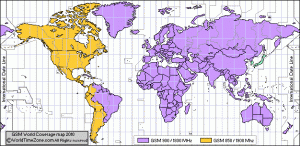
Global map of GSM frequencies. Image credit: Worldtimezone.com
Once you’ve got a network-unlocked MiFi you can avoid roaming costs by buying local SIM cards in the countries you visit. A bit of homework on settings and pre-pay tariffs can yield massive savings.
If you plan on doing this in the US or certain parts of South America then avoid the Three MiFi (E585) - it doesn’t support the frequency that 3G networks operate on in that region. All the others mentioned will be fine.
Non-MiFi Options
If all of that sounds a bit like hard work another option might be to grab an old handset to use as a WiFi hotspot instead. These solutions are generally less reliable or elegant than a dedicated MiFi but could be useful for occaisional or emergency use. Checkout Joikuspot for Nokias or WMWiFiRouter for Windows Mobile devices… The iPhone 3GS takes a ‘normal’ SIM and is rumoured to be getting this functionality soon. Recent versions of Android have had this built-in for a while.
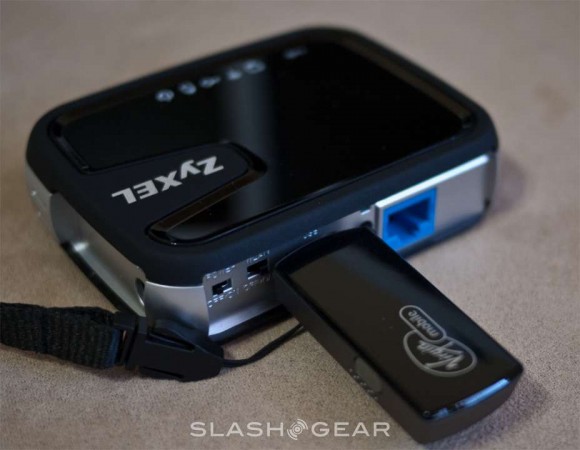
The MWR211 mobile router. Image credit: Slashgear
Another option is ZyXel’s just-announced MWR211 mobile router which accepts certain USB-sticks. Slashgear has a good first look.
Can you improve on this - any top tips for getting cheaper / better MiFi devices?
Image credits: Slashgear, Worldtimezone.com